Showing posts with label Marketing. Show all posts

Friday, March 30, 2018

5minlib Recommends: Super Library Marketing

Let's talk about library marketing. It is an important part of libraries. It is how we get the word out about our collections, boost attendance to our programs, share with the public the good we do for our communities, and how we bring in new cardholders.


But there are so many different ways to advertise, so many different formats to use, and too little hours in the day to get it all done. We at 5minlib wish we have the perfect library marketing plan for you, however our expertise is limited. But there's good news! Angela Hursh is a content marketing enthusiast and she shares her wisdom on the fantastic Super Library Marketing blog. As she says in the tagline, it is all kinds of marketing ideas for all kinds of libraries. It is one of our favorite blogs and we're excited to highlight it today.


What we love about it:

Hursh has a wealth of marketing ideas from different kinds of social media to signage. She breaks them down into easy, doable steps. She also explains the pros and cons, the do's and don'ts, and provides examples so you're armed with everything you need to know to really up your library marketing.

For example, Hursh is a huge proponent for email marketing. She not only explains why, but gives you tips on how to write good subject lines, content, spam words to avoid, and how to analyze marketing data. Marketing takes up a lot of time, but with Hursh's blog, you can focus your time on the parts that'll really make a great impact.

Our Favorite Posts:

Subject Line Secrets: Get Emails Opened Now!
Five Excellent Ways To Improve Every Sign in Your Library
Boost Attendance at Library Programs–How to Start a Revolution
Four Instant Ways to Improve the Most Valuable Page on Your Library Website
Now Is the Time For Your Library to Get Back to Snapchat

Hot Tips:

To easily find specific topics (like emails, Youtube, Snapchat, signage, etc.), use the search feature on the right. When you click on an article and scroll to the end, you'll find tags which lists the keywords for her categories so you can find more on that topic.


Where to go:

You can go to the website at www.superlibrarymarketing.com. You can also follow Hursh on Twitter, LinkedIn, Instagram and Pinterest via @webmastergirl.

Friday, September 1, 2017

You Can Now Link Your Facebook Page to a Group (and why you may want to do this)

Facebook recently announced that ALL pages can now link their page directly to their group. How awesome is that? This is so exciting for many reasons:


1. It Is Hard to Find New Groups on Facebook

Unless you know the exact name of the group you are looking for, it is hard to find them in the Facebook search. Now that you can connect your groups directly to your page, this will allow patrons to easily locate your groups. All they have to do is visit your Library Page, and go to the left side. (For how to link your groups to your page, visit this handy article from Grytics!)

2. Groups Work Differently than Pages

If you ever considered making a group for your library patrons, now is the time to do it! It could be ideal for many reasons:

  1. Groups get higher priority in the news feed than pages (so, patrons are more likely to see your posts).
  2. It'll allow you to divide your followers into appropriate groups. You can make a group for teens, another for parents/caregivers, another for adults and only post the relevant information into each section. It may also provide a way for patrons to connect with each other -- a local community with people they wouldn't normally have a reason to reach out to (especially if your town/city DOES NOT have a special Facebook group for residents).
  3. You will have the ability to comment and like as your page in your groups, which will help patrons know it is "the library" that is responding.
  4. Facebook acknowledges that it can be time consuming to accept people into groups, so they added a filtering feature where you can easily sort the requests by location and accept/deny at once. You can also add a questionnaire with up to 3 questions that new members must answer before they apply if you want to expand your reach beyond what locations they have listed on Facebook.

3. Bump Your Post Reach With Targeted Marketing

Not only can they easily find the link on your page to your group, you can also easily share your relevant posts to this group. Targeted Marketing! When people respond to your post in the group, it'll bump up your post reach on your page as well. And, as we all know by now, when your current post gets interactions, it'll do better and increase the reach on your next post. That's a win/win!

4.  Group Analytics

With targeted advertising, you'll be able to see what posts are working for your specific groups: the demographics as well as the days and times they are active online. This is valuable info that you cannot parse from a generic Facebook Page which all patrons follow. And new to Groups: Admins and moderators can create and schedule posts to publish at a specific day and time!

Do you have a successful Library Facebook Group? If so, please share in the comments! We'd love to hear what types of groups have worked for you.

Additional Info:
Our First Communities Summit and New Tools For Group Admins
3 Reasons Why Facebook Groups May Offer New Opportunities for Brands
How to Link Your Facebook Groups and Pages
Facebook Groups Can Now Screen New Members With a Questionnaire

Friday, March 10, 2017

Save Hours Advertising Programs: The Beauty of a Template

It took me four years into my previous position to realize that I was advertising my programs all wrong. It was standard at that library to make a flyer for every upcoming program, so I followed it. And for each of these programs, I would make a brand new flyer.


I loved being creative, so it was one of the fun parts of my job. But it was hard to always come up with a great professional design -- and it was time consuming. When I started to try to find ways to be more productive, I realized that I needed to let go of my desire to create and make a template.

Art design was not my specialty, so it took many attempts to come up with a template that worked for all of our programs. Then we realized we needed a logo for our library (which I am proud to say that I did design with the help of my husband) and then my director hired someone with art skills who made an even better template than I did.

An amazing thing happened-- four, actually:

1. I Saved Hours of Work

There are people out there who can whip up an awesome flyer in no time, but that wasn't me. I can make a decent one but it required lots of creative energy and some trial and error until I came up with the perfect design. But with our template, I could make a new flyer in minutes and know I would immediately be happy with it. That's a lot of precious time saved!


2. Everyone Used the Template

With the new design, my coworkers were able to easily use it, too. Now everyone, even those who felt they didn't have any artistic skills, could make a flyer for their own program. (Or I could easily delegate this project to someone else who needed something to do.) There were a few hurdles for us to jump through (I did teach some of them how to use our art program) but the end result was something with which we all could be happy. And I like teaching, so I didn't mind those sessions at all.

3. We Advertised More

Having a template and an easy way to make flyers meant we could bang them out quickly. We also made a template for our website slider, so it was really easy for us to constantly update the website with the current information. Before, we had to constantly change our design to fit whatever medium we were using, but with these templates, it was easy to adapt the designs accordingly.

4. We Established a Professional Library Identity

Once we had a great template and used it consistently, we realized we had established an identity. There was no question what was a library flyer and what was a community flyer. We also gave a united front -- every department used the same template in the same artistic style, so we were providing the consistent message across the board.

Template Example

Below is an example of the template we used at my previous library. The top always began with a short title in the same font. Below it was the date and time. We included an image of what the program would be about, then a short description. In the bottom header is the library location and contact information. I no longer had to worry that I forgot something essential because it was standard on all our templates.


Do you have any templates to share? We would love to see them in the comments.


Like this post? You might want to check out:

     Catch Patrons' Attention with These 7 Easy Flyer Tips
     Canva: Make Easy Designs In Little Time
     5 Secret Tricks to Using Canva like a Pro!

Friday, September 2, 2016

#LibraryHappinessIs Winning $100!


#LibraryHappinessIs a chance to win $100 and a Sally READ poster!

ALA is running a fun campaign during library card sign-up month. From now until noon September 22nd, patrons and librarians are encouraged to share what library happiness means to them on Twitter, Instagram, or the I Love Libraries Facebook page. Tweet, post a photo, or make a short video and use the hashtag #LibraryHappinessIs. One random winner will be selected at the end of the month!


And if you aren't already participating in September's Library Card Sign-Up month, head on over to ALA's official page. Snoopy is the official spokesdog and they have lots of free goodies for you to use!


  • Social Media Images and Cover Art
  • Downloadable Flyers
  • Sample Press Release
  • Sample PSA Scripts
  • Free artwork for library cards
  • Free artwork for billboards
  • 2 Free webinars: How to Leverage Snoopy to Run a Library-Card Sign-Up Campaign 
  • Free webinar: Using Door-to-door Marketing for Library Card Sign-ups

Let's all participate in the fun! How wonderful would it be to see Instagram and Twitter trending with #LibraryHappinessIs? For us, that'd be just as awesome as winning the grand prize. 

Friday, July 29, 2016

Entice a Pokémon Go Player to become a Library User with these 5 Conversation Starters!

Since Pokémon Go's launch on July 6th, many "trainers" have been flocking to the library to capture Pokémon or collect Pokeballs. We've been seeing lots of great ideas of how to encourage these players to become library users (just check out the Facebook page, Library Pokémon Go Support). Today, we thought we'd come up a list of ways you can explain to them how the library works, in terms of Pokémon Go, for potential new library users!


5 Conversation Starters

  • You know how the Pokémon Go app is freely available for download to everyone? Our library is open to everyone, too, and we have a free app you can download on your phone as well. [If your library doesn't, one of your vendors might: OverDrive, Freegal, etc...]
  • Like collecting different kinds of Pokémon? We also offer lots of different kinds of items for you to check out: DVDs, CDs, Videogames, Newspapers, Magazines and more! Just like there are more Pokémon than Pikachu, we're more than books.
  • Did you know libraries are like PokeStops? They are open for anyone to visit them and if the library is on the same network as yours, your library card will work there, too.
  • Enjoy meeting new people and competing in Gyms? You can find lots of free events for any age group here at the library.
  • Like earning badges? Many libraries have competitive summer reading challenges. Find out the different ways you could win.
We're so excited to hear that many libraries are PokeStops and Gyms. One library posted online that, due to the game, 15 new people visited their library one Saturday and seven of them made a library card while they were there. So, Pokémon Go could really be beneficial to libraries, let's harness that!

If you haven't played the game before, here is a great post to help you learn about it, Everything Librarians Need to Know About Pokemon Go.

Friday, July 8, 2016

8 Simple Photography Tricks Every Librarian Should Know


Let's talk about library photography. If you are lucky, newspaper reporters will come in and cover your programs. But even if they do, it is still important to take your own pictures of your events for the library website and social media, at the very least. However, photography is something that they don't teach you in grad school, so we're left to our own devices. Over the years, I've learned a few tricks that have upped my photography game. Maybe you'll find these helpful, too.


#1. Camera type does matter!

I couldn't believe how much of a difference it made when we bought a DSLR camera, the Canon EOS Rebel (thanks to the our teens voting for a Photography Makerspace). Sure, you might get some great shots with a regular camera or on your phone, but even leaving the DSLR camera on auto, it automatically blurs the background. Overnight, I became a better photographer! It is worth the money to upgrade.

#2. Focus on patrons, not your performer.

A photographer expert gave me this great tip that I never even realized -- if you focus on the performer, you are giving that performer free publicity. But if you focus on the faces of your patrons enjoying a performance, you are giving your library good publicity. Just make sure you get their permission before you post the photos online.

#3. Take pictures behind your performer.

So, to help you get a good spot for focusing on your patrons' faces, you should plan ahead. Ask the performer to move a few feet out into the audience and then station yourself behind them. If your patrons are sitting on the floor, lie down on your stomach so you'll get a good angle.


#4. Natural light makes the best pictures.

I learned this trick when I was taking shots of my newborn. Nothing looks better than bathed in natural light. Use this to your advantage -- focus on the people who have the best natural light on them. If you are in a room that has no or little natural light, turn on as many lights as you possibly can ahead of time to increase the quality of your pictures. (Especially since you'll want to turn off the flash if you are taking photos during a performance.)

#5. Focus on the eyes.

Even if you don't have a DSLR camera, many cameras these days have a function where you can pick a focus. When you're trying to get a great shot of a specific patron, make sure you're focused on the eyes. When the eyes aren't sharp, the picture won't look right.

#6. Be creative!

The subjects of your photos don't always have to be centered in the frame, or looking at the camera. Frame the shot with a bookshelf, to remind the viewer that the event was in a library. Get behind a viewer at a program, so you're looking over their shoulder to see what they see. Or, if you want to avoid faces, focus your shots on the finished products.

#7. Add the photography release to your registration.

There is a big debate about whether or not a library needs to have a photography release form. If you decide to do this, make it easy for yourself and patrons and include it right into your registration. If it is paper sign-up, you can hand them the release immediately afterwards. If it is online registration, even better! In my previous job, I worked with Eventkeeper to format a section to our online template form that was the Photography Release statement and asked them to mark "yes" or "no" if they accept these terms. I used this registration template for ever major event, but technically patrons only need to sign the form once and it covers their lifetime. But however you do it, it is good to have the majority of the releases done so you only need to worry about walk-ins at your event. (It also makes your newspaper reporters very happy to have this done ahead of time.)

#8. Create a Photographer Volunteer Role.

Lastly, if you are trying to run a program, it is really hard to also find time to take pictures. To solve this problem in my previous library, I created a volunteer role for in-house photographers. We opened it up to teens and trained them for a few days, then they could select which of the upcoming programs they wanted to cover. It worked out well for us and the teens really enjoyed it and took impressive shots. I made sure they downloaded their pictures on my computer before they left and then I used them for our social media, making sure to give the teen photo credit. It was a win/win partnership for us!

Do you have any photography tips? We'd love to hear about them in the comments.

Friday, March 11, 2016

Does Your Library Transform Lives?

A few months ago, ALA announced their new public awareness campaign called Libraries Transform.


WE LOVE THIS.

From the clean and bright design to the message behind it. It is so positive. It moves the conversation from how libraries are obsolete to how libraries are making a difference in people's lives RIGHT NOW. This is so desperately needed today as we fight to stay open and to change public perception of who we are.

This design says the message loud and clear:

Examples of some of their signs.

But since it was announced back in October, I haven't seen any libraries in my area jump on the bandwagon. I follow many listservs and I don't even see this campaign mentioned in their email signatures. And I wonder why not.

  • Do people not know about this campaign?
  • Did it fall off of our to-do list, as we try to squeeze a million things in our day?
  • Or, perhaps, people have opted to not participate?

If the latter is true about opting out, that's fine. But it'd be a real shame if people aren't participating because they haven't heard or forgot about it. If that is the case for you, let's take five minutes to talk about what you're missing out on.

1. An Awesome Key Message

We do transform lives, but we don't do a great job letting the public know about it. Not only will this campaign give us an opportunity to do so, but banding together will make our message stronger and consistent. 

2. Free Posters, Bookmarks, and More!

You can register for a free account to have access to their toolkit of FREE posters, bookmarks, web banners, and postcards that you can just download and post around your library. You can use their logo on your flyers. You can add their tag line to your email signatures. It doesn't take much to participate in this campaign.

3. An Upgrade to Your Outside Walls

You can also order window clings and banners to place around the library. And you can create custom create buttons for staff. You can have a lot of fun with this theme!


4. A Fun, Meaningful Patron Interaction

Patrons can participate, too! They can go to ilovelibraries and share their story. Maybe a fun idea for National Library Week?

OK, I Am In, Now What?

ALA and ilovelibraries.org has you covered. You can visit their website and make a free account to access all of their great materials. They have everything from a full-fledged campaign to changing your email signature. You can get as involved as you like! Here are some ideas they suggest that we love:
  • Tweet about your most innovative and impactful services using the #librariestransform hashtag. 
  • Download and print “Because...” posters and them around your community. Think about posting them in unexpected places. 
  • Download and print the postcards and send them to your stakeholders with messages about new, innovative programs and services at your library. Or, use them to reconnect with lapsed cardholders, inviting them to re-visit the library. 
  • Include Libraries Transform messaging in your community newsletters, e-newsletter or regular email blasts to stakeholders. 
  • Invite your community members to share their stories of how “libraries transform” on your social media platforms – Facebook, YouTube, Instagram, etc.
So, it doesn't have to take much to participate. If you can take a few minutes out of your day, it could make a world of a difference. In marketing, there is the rule of seven. They say that customers need to see/hear something seven times before they remember it. So, let's get this message out and say it loud and clear.

Because we do transform lives.

Every.
Single.
Day.

It's about time that people knew about it. :)

Friday, November 13, 2015

Top Ways to Advertise Library Programs - Part 3

Welcome to the third installment of the Top Ways to Advertise Library Programs! In Part One, we discussed posters and the best places to use them. In Part Two, we talked about media and social media. Very useful! But this week... we get to talk about the FUN stuff.

Why try some unusual advertising ideas? Well, the main reason is that the sillier your idea is, the more likely it will get noticed. Also: I'm a strong believer in the philosophy that, if you have fun with what you do at your library, then others will, too.


Unusual Advertisements

This is where you can really get creative. Here are some ideas I have used in the past; I'd love to see yours, too!
  • Sidewalk signs - I used to have these amazing sidewalk signs! They were plastic, and you'd draw on them with paint pens, which would wash off with window cleaner (but not just water, so they were safe to use in the rain). I had several of them, in both black and white, and I used to be able to get super creative with them. After all, they had to be read by people driving past, who were busy with driving, listening to music, and all the other distractions of daily life. In addition, our movie license did not allow us to use the name of the movie outside the library. What's a girl to do?
If that girl is me, she draws somewhat-recognizable characters from the movies in question, and puts them on the sidewalk. (Did you guess Ghostbusters and Wreck It Ralph? A gold star for you!)
  • Window paintings and bulletin boards - large, colorful, and eye-catching designs are best, and also fun to make. I made this bulletin board for our Moomin Party, and we got tons of attention for it. (Mostly, "what's a Moomin?" but that's totally fine by me - let's get a conversation started and I can sell you on it.) In addition, we discovered that the paint markers we used on the lawn signs (above) could also be used with no ill effects on the painted metal doors of the elevators. WIN! I drew R2D2 for our mini Comic Con (GeekCon), and he got us a lot of attention.

  • Chalk drawings - Pull out the bucket of chalk and get to work on the driveway, parking lot, and sidewalks. We did this a lot with the Geek the Library campaign, and I remember it from when I was in college - clubs would have big arrows and drawings on the sidewalks to let people know about meetings. 
  • Wearable ads for programs (or the library in general) - I can't tell you how many times I had someone ask me what "What do you Geek?" meant, when they read it on my t-shirt. Many libraries will make buttons that patrons (especially teens) will wear to support upcoming or ongoing events and clubs. This also works for lanyards (particularly for college kids) and reusable bags. I can't tell you how happy it makes me to see people walking around town with their "I <3 My Library!" tote bag.
  • Wearable ads from programs - Our teen librarian did a program with henna tattoos during the last week of school: "where did you get that?!" turned right into an ad for the library. This also worked for my tween Jewelry Club. "Where did you get that necklace?" "I love your bracelet!" "I made them at the library!"
  • Props and cardboard standees - When we had our first Doctor Who Day, I made a TARDIS out of an old partition, and we borrowed the beautiful David Tennant (sadly, a cardboard version) from a fan of the show. Not only did an amazing number of people walking through the door say, "it's the DOCTOR!," but we had people stop to take their photo with him... and there was a poster he wore around his neck, advertising the party, thus giving them all the information they needed- right in the photo!
Photo credit to Tina McEvoy, Lawrence Library, Pepperell, MA
We also had two (long story) Darth Vader standees. One day when I was feeling particularly daring, I crawled out and put one of them on the balcony that overhung the reading room, where he quietly loomed over our patrons. When people noticed him, they might also notice the "MAY THE FOURTH BE WITH YOU" sign advertising our Star Wars party. 

Side note: I kept Darth in the Children's Room for a while, until one small child turned around to see him right behind her. People don't seem to have an issue with a random Harry Potter hanging around, but a random villain can be scary. Just a heads' up.

Did we miss anything awesome? Please let us know in the comment
s here, on our Facebook page, or on Twitter! We would love to hear from you!


Missed our other posts? Check out:

Friday, October 30, 2015

Top Ways to Advertise Your Library Programs - Part 2

Welcome to Part Two of our three-part series about advertising your library programs. In Part One, we talked about posters: where to put them and how to use them. Today, we're going to talk about a different kind of advertising: the wide world of media and the even wider world of social media.

 Media


Ah, the media: newspapers have been the place people go for information for over a century, and though many papers are now read mostly, if not entirely, online, this doesn't mean that they're gone. Try...
  • Online newspapers - Have you seen patch.com? They are a large online news resource that covers communities across the United States. In addition to posting their own content, users (that is, us!) can submit our own news, press releases, stories, photos, and events to be posted on their website. Take a look! 
  • Community Calendars - Many local papers (town-wide, county-wide, or larger) have a calendar of local events. Make sure you get the contact information for the calendar and you can email over the big attractions as they come up. 
  • News articles - Write up a press release where you justify how your event is The Big Thing in town, and you could get a full story in the paper. Many papers will often print photos, too! How? Well, that's an article in itself, but the best way I've found is to highlight local people: Write about how a local fireman is taking time from his busy schedule to read to children. Write about how the Teen Advisory Board planned this program, for teens and by teens. Write about how the little old lady teaching flower arranging next week has been doing this for fifty years and is sharing her life's work with YOU, the reader, HERE! For FREE! Including photos is also a good way to get attention. Papers will sometimes print a photo with a caption, even when they don't have room for an article. 
  • News interviews - If something really exciting is going on, some local news stations will send a reporter to talk to you about it. I got onto public access news when we got a turtle for the Children's Room. The local station at my last library always sent a film crew for their Live @ Lawrence Library music programs. Photographers will often come for performers or large events, too. Granted, these are published after the fact, but it brings attention to what your library has to offer, and that is never a bad thing.
  • Newsletters - Don't underestimate the power of the written word! My library currently writes a quarterly newsletter that highlights events for all age groups and includes calendars of events, articles written by staff, and book recommendations. These can be brought to local businesses and to town events (see Part One for ideas of where to leave fliers and newsletters!) and be offered at or near your circulation desk for patrons to take.
  • Event Calendars - In addition to our online event calendars, I've found it's also incredibly helpful to have monthly event calendars available for patrons to take with them. In the Children's Department (which is my domain), we design them so that one side is a monthly calendar with events listed on each day, and the reverse has a brief description of what each program is. Despite the fact that everyone seems to be online these days, I start getting requests weeks before the new month has started. I've even had families who have told me that they wait until they get the new calendar before planning family events. (I can't tell you how good that feels!)


Social Media

  • The Basics: Facebook, Twitter, Instagram, etc. - Sharing information on your own page is good (especially with pictures!), but it's an even better idea to make sure you follow local groups, schools, clubs, etc. online, and send them your information. If you ask nicely, they may share it! This works especially well if they have a presence on Twitter, where you can talk as much as you like (as opposed to Facebook, where you don't want to post too often, lest you overwhelm the reader). Be sure to check your favorite social media outlets for local parent groups, Boys and Girls Clubs, and the like.
  • Online Newsletters - There are several ways to send out online newsletters, including MailChimp and Constant Contact. I am not an expert in these fields, but that's okay, because companies that work with mass mailings are experts, and they make things as easy as possible for the librarian-on-the-go. One of the many perks to using a program to mass-mail is the ability to link online. If you write book reviews, you can link the book right to your catalog so that interested parties can immediately put the book on hold (no lost little slips of paper!). Instead of asking patrons to log on and "like" you on social media, you can link right there and they can do it right away! Another upside is the meta-data. How many times is the email opened? Which links are clicked on most often? They will tell you. From this information, you can extrapolate from your patron-base what it is they really like. Lots of book links clicked? You may want to write more reviews. Lots of clicks on the children's programs? Perhaps that department needs its own newsletter. It's all in the data.
  • Facebook Events - We have talked a lot about the use of Facebook before, and I'm sure we will again, but have we mentioned how much we like the new Facebook Events feature? Rather than posting one photo to say that a program is coming up, try creating an official Event for it. It still pops up on your wall as soon as you post it, but it will also be available under the "Events" tab on your page, and will be listed as an Upcoming Event for people who say they are interested. People can also subscribe to your events, so you're sure that everyone who wants to will see them, instead of relying on whatever the Facebook algorithm says is okay to show.
  • Facebook Ads - I'm all about free, but Facebook Ads give you a huge bang for your buck. For a couple dollars, you can have your information show up as an ad on local people's pages, which will drastically expand your reach. By all accounts I've heard, it is worth the money for your larger events.


Overall

In closing: don't underestimate the power of the media. Expand your presence in print and online, and watch your program attendance grow! Last time, we talked about posters and fliers. In Part 3, we will be discussing some of the more unusual ways to promote your programs. (Silliness - my favorite!)

Did we miss any media angles? Please let us know here or on our Facebook page or Twitter feed.

Don't Forget to Check Out:

Part One: Posters, Flyers, and Where to Hang Them
Part Three: Unique Advertising Ideas 

Friday, October 2, 2015

Top Ways to Advertise Your Library Programs - Part 1

So you have an awesome new program coming up, and you're super excited. That's fantastic! Now, how are you going to get the attendance your program so richly deserves? That all depends on how you advertise.

Naturally, you want to tailor your advertisements to the program's target demographic, but don't forget that parents often make plans for their children, older patrons sometimes have visiting kids and/or grandkids, and word of mouth is incredibly valuable. It can't hurt to try some different things, right? In this three-part series, we will be discussing some average (and not so average) ways to advertise. First up...

Posters, Flyers, and Where to Hang Them

Sure, we've all made posters, and they go up on the door, or maybe on the bathroom door if we're feeling ambitious. Where else can we put them? Well, that depends on your audience. Have you tried...
  • Local schools - If you email the superintendent, you can often get permission to hang signs in the school library, if nowhere else, but making sure that the teachers know about your programs can help promote library services to students, school faculty, and parents. Don't forget that teachers are potential patrons, too. Maybe the English teacher is just dying for a book club to join; maybe she will see the sign in the Teachers' Lounge and be your new best member!
  • Senior centers - Again, the programs you advertise there don't have to be just for seniors! Yes, there is "competing" programming going on at many senior centers, but when you work for the town, collaboration is always a good thing. Unless you are doing a movie program at the exact same time as their movie program, you probably don't have to worry. I have often advertised Children's Room programs in the Senior Center, too, This is particularly helpful for Summer Reading ("the kids are visiting and I don't know what to do!") and the our library's circulating collection of toys and games ("the kids are visiting and I don't know what to do!").
  • Recreation centers, yoga studios, gyms - When playing sports and games, there is often almost as much time waiting (for your turn, for the game to start, for your ride home) as there is playing. Why not give these poor waiting people something to read and look forward to?
  • Local businesses - Coffee shops, restaurants, bookstores, and other places where people linger will often have bulletin boards dedicated to local events. If you ask nicely, you can often hang up a poster, which lets their customers (and staff!) know about your upcoming awesomeness. This is particularly useful if the business has a connection to your event. For example, hanging a flyer at a comic store or game shop is perfect for promoting teen Wii Game tournaments or board game parties.
  • Other areas of the library - You'd be surprised how few libraries will advertise the adult Summer Reading Program in the Children's Room, even though there are usually just as many parents as children! This holds true the other way around, as well. Patrons have families and friends, and they will let them know if they see something they might enjoy. If you have something complicated enough that a quick glance at a flyer might not be enough, try hanging them inside the bathroom stalls - you have a captive audience!
  • Inside of books - When I did a Zombie Party, I put flyers inside copies of The Walking Dead graphic novels. Pete the Cat party flyers are inside all Pete the Cat books. Hide Classic Movie Mondays flyers inside biographies of classic Hollywood starlets, Fantasy Book Club flyers inside fantasy books, and "Did You Know We Have A Database About This?" flyers inside reference books. I have also seen some great e-book bookmarks inside books on the shelf where the e-book version was available through our catalog. "Check it out now, or download it from home!"

Things to Remember:

If you're not used to posting flyers outside your library, there are a some things you might not have needed to think about before. A few things to consider:
  • Make sure that all flyers are clearly labeled with the library's name, address, and contact information. It wouldn't do for a potential patron to be interested in a program, and not know where to go. 
  • Less (information) is sometimes more (attention). You want eye-grabbing art and words, because you are competing with not just the other flyers on the bulletin board, but the entire world around that bulletin board: smart phones, pumpkin spice lattes, best friends meeting up for lunch, someone's dog who is just so darned cute. Large blocks of text will be skimmed over if not ignored: it's better to get someone's attention and point them in the right direction for more information than to not grab them at all.
  • Also, please ask permission before you start hanging things up. Let's not be silly about this. 
If you have a favorite place to hang your flyers, we would love to hear about it! Please let us know in the comments here, on our Facebook page, or on our Twitter. You can also follow us there to make sure that you never miss a post.

Don't miss reading Part 2: Media and Social Media and Part 3: Unique Advertising Ideas!

Friday, April 10, 2015

5 Secret Tricks to Using Canva like a Pro!

Back in December, we wrote a blog post about the online program, Canva, which makes designing for social media and flyers a breeze. Back then, we explained how it works and showed screenshots of the easy website.

Today, we're going to share five secret tricks to make Canva work well for the everyday librarian.

#1. Design for Multiple Social Networks in One Image!

The biggest flaw to Canva is that you cannot easily make one design and reconfigure it for the different social networks. There are two ways to work around this:

1. Social Media Examiner wrote a post called "How to Optimize Your Images to Work Across Social Networks" where they figured out the measurements of Facebook, Twitter, and LinkedIn and how you can design one image that when uploaded to all of these networks, will still look great! Your words won't be cut off!


2. One of my coworkers taught me this other trick. When she wants to reuse a design for a different social media network, she downloads the image and re-uploads it in the next format she'd like to use. It isn't as fast as number one, but it will work for any platform!

#2. Skip Canva's Images

Canva used to list the free images first in each section, but recently, they mixed them together and there is no way to search for only the free ones. It isn't worth the hassle to manually search through them. I usually browse the templates to see what I like and then go to free image websites to quickly search for what I am looking for. I still like 123RF, though lately I've been using MorgueFile (http://morguefile.com/) and using images that do not require attribution for a cleaner look.

#3. Download a Color Picker

One great way to pull together your words and images is using a similar color scheme. Download a color picker which will tell you the exact code for the colors in your photo. I really like ColorZilla (http://www.colorzilla.com/), which is an add-on for Chrome and Firefox. It is just an icon that sits at the top of the browser. You click the icon, then  the color you want to copy on your image and it automatically saves the color code. Then in Canva, when you are changing the color, you click the "+" symbol and you can paste the code on the bottom. Ta-da - instant match!


#4. Use a Color Combination Finder

Do you have trouble knowing which colors will look great together? Use a color combination finder to quickly recognize complimentary colors! I really like Coolors (http://app.coolors.co/). You can type in your color code (which you can get from the Color Picker above) and just press the space bar to find other color combinations. When you find one that you like, you can just copy that code back into Canva.


#5. Pay Attention to the Advanced Features!

Did you know that you can blur the background or change the color tint of an image? It is easy! When you click the image and then the toolbar, you will see the option to Filter. In the Filter box, you'll see "Advanced" in small letters on the bottom left. Click on that for these great options! If you want them to disappear, just click on "Simplier" on the bottom left.


Bonus Tip!

Do you want to move fonts and images as one group? Just click outside of the image window  (in the grey area) and (while holding down the left click on your mouse), drag the mouse over all elements you wish to move. Let go of the click and then use your arrow keys to move the group.

If you have any other suggestions, please share below!

Friday, January 23, 2015

Catch Patrons' Attention with These 7 Easy Flyer Tips

This week I am excited to announce that we have a guest blogger, Dan Barbour from Shrewsbury Public Library. He is a YA Librarian who has excelled in flyer design that has sold out events. Today, he is going to share a few tricks that he's learned along the way.

I've worked in libraries over half my life, and while I've seen many different aspects of library programming surge forward into new and exciting territories, one important element that is often left in the Stone Age is event marketing. I've been designing library program ads since before I could drive a car, and I've learned a few basic tips which I'm going to share. Do with these pointers what you wish, but I can assure you, programs don't always sell themselves, and a few tricks can be the difference between a room of empty seats and a successful program. There are many programs you can use to make a sign, but I highly recommend investing in Adobe Illustrator - the flexibility is so much better. (Jess Note: but if you cannot afford Adobe Illustrator or are intimidated by its learning curve, check out our post about Canva) Here we go…

1. Less (Text) is More

* The rule of seven lines for text is a good guideline to shoot for, but many times you need more, so try using boxes/blocks to break up text. Some programs require a full presenter bio and/or sponsorship information that you cannot edit or leave off…make this as small as possible not to discourage readers. If it looks like it’s going to take too long to read a sign, most people won’t read it at all.

* If there is information that isn't crucial to your sign, in all cases leave it off the sign!

* Consider adding a QR code and/or website link for additional text that you in turn can leave off the sign. Interested readers will then have the option to learn more. The site www.qrstuff.com is a great free and simple resource for creating QR codes. Even if people don’t use the QR code, it makes your sign look more modern and “with it”!

2. Don't Go Font Crazy

* With the exception of company logos, keep your signs to no more than three different fonts. Also choose fonts that are simple to read, especially from a distance.

* Sites such as www.dafont.com allow you to download free fonts that look better than the standard set that could make your sign look less professional.

3. Use Size and Space to Your Advantage

* Use the space you have - don’t be afraid to make your text as big as will fit the area you are working with.

* Play around with the alignments (center, right, left, justified) – in many cases center aligned looks the best.

* Some signs need TONS of information and you cannot get around it. To make this excess text look better, consider using an inverted text box like this:

4. Watch Your Colors

* Be careful with colors – using yellow text on white is one example of a bad idea (which I have seen used more than once!). Here is a guide to complementary colors – I find it a useful tool when thinking about what colors to pick when designing an event ad - http://www.tigercolor.com/color-lab/color-theory/color-harmonies.htm

5. Convey Your Message Through Font Size

* Focus on the point/message when choosing which text to enlarge and which text to keep small. Example:
With this kind of sign, the topic is that the Library is closing, so that should be what is emphasized. Adding the year is not necessary in most cases – we wouldn't be posting a sign like this a year in advance, and people know that if the sign is on the window at the library, the sign pertains to the library – those details shouldn't be equal in size to your reason for posting the sign.

6. Get Graphic

* Adding clipart is similar to adding text in that too much can look overcrowded and take away from the message of your sign. That being said, it’s nice to have signs that aren't just all text. (See post from last September about 123RF.com for free quality images)

* If you are advertising a recurring event and have photos from the last program, use those. People love to see real depictions of the program as opposed to cheesy stock clipart. They also will be more likely to show the sign to their friends since they are starring in it.

7. To-Go Signs

* Sometimes no matter how amazing your sign looks, those reading it get busy and forget everything they just read. I've found it very helpful to make a small sign and have a pocket attached (I use old date due card pockets!) with miniature versions containing just the very basic information. It’s also exciting to see how fast these slips go – a great way to gauge interest in a program, especially if it’s a drop in event.

Those are some simple tips than can elevate your sign making, but the best way to make a great sign is simply to play around and do it often. Practice does indeed make perfect….or at least better. So the next time you’re ready to send off a sign to a bunch of your area libraries asking them to post an event sign, be proud of what you’re distributing!


DAN BARBOUR is the Young Adult Librarian/Volunteer Coordinator at the Shrewsbury Public Library in Shrewsbury, Massachusetts. He has spoken at MLA, NELA, and other conferences/workshops on information literacy, youth programming, and advertising events in libraries. He is also the owner of Vertigo Trivia (www.facebook.com/VertigoTrivia), an interactive event service for libraries, restaurants, and cooperate/private events.

Friday, January 9, 2015

10 Facebook Tips Patrons Wish Their Libraries Knew

Every library knows it should be on social media. After all, that is where patrons are. But what they don't know could actually be hurting them. Thankfully, you have the 5 Minute Librarian here to tell you the ins and outs.

1. Post Often or Not At All

A Facebook page is not a Facebook Person Account. Your followers are not going to see all of your posts. If you're not posting often, they're very likely not seeing many of them. All of that work, for nothing... Might as well just close your account.

2. But Not Too Often

Of course, if you post too often, people will stop following you. One rule of thumb that I keep hearing about for libraries is to post twice a day. A serious library post in the morning and a fun post in the evening. In a future blog post, we’ll talk about scheduling posts, the pros and cons and 3rd party applications that can make your life easier.

3. Don't Be So Self Focused

Everyone in social media will tell you that you blog 1/3 of the time on your content and 2/3s you share outside content. This is actually a good thing. If you are posting twice a day, you will have to post about more than your library. Thankfully for you, there is much at your disposal. You can repost from local businesses, newspapers, schools, communities, and your city/town. You can share information about books and movies based on books. You can connect to current events with your collection... Stay tuned for a future blog post about how to easily find things to share and boost your post numbers.

4. Pictures are Worth a Thousand Words

Always include a visual with your posts. Studies show that it greatly increases the amount of people who click on your content. As we mentioned in a previous post, you can go to Library Market and sign up for access to a Dropbox Folder of Library content you can publish. And you can easily create your own using Canva.

5.  You Live and Die by Clicks and Likes!

Do what you have to do to get interactions from your followers. The bottom line is - the more people who interact with your post, the more Facebook will share it onto other people's feeds. This is a good thing! Even click bait is a worthy technique (i.e. click here to learn...), if your patrons like to click on the links and they're being redirected to worthy content. NOTE: We just started a new Facebook Group called The Shareable Clique for libraries to share their successful posts. Join the group to find new content to reshare on your own library page and to post about your triumphs!

6. Don't Kiss and Tell

You don't need to post EVERYTHING on Facebook. Yes, your library may offer a lot of programs, but you can skip the ones which aren't of high interest. Remember - if you post things that people aren't interacting with, it hurts your future reach.

7. Pay Attention to Your Facebook Insights

So, what are people interacting with? Well, Facebook has an insight page that shares exactly this information. Check it out frequently. Try new things and see what resonates with your followers. Then imitate. If you need a list of ideas of things you can try, check out Boom Social's 17 Killer Facebook Posts for Small Businesses.

8. Seriously, You Have Time for Facebook Insights

I cannot stress enough how important it is to pay attention to what your readers are responding to. Here is a gold mine of what they like, what information they want, and what time they're able to read it -- why not tap into it and get the most bang for your efforts? The more readers who see your content, the more they'll know about your library and the more they'll care about you, too. We're working on a future blog post that will talk about different ways people have succeeded on Facebook that you can try out.

9. Tell Followers They Can Be Notified of ALL Your Posts

If your patrons do not want to miss a post from the library, tell them that they can sign up for notifications for every post. They just need to go to your page and click on the arrow on the "Liked" box and then check off notifications. Advertise this fact often!

10. Try a Facebook Ad 

It is actually very successful for some libraries. It isn't that expensive and it actually reaches your nonusers in a way that no other library advertising can -- right in their homes.

BONUS Tip: Be Kind To Other Libraries

One thing that many librarians do is follow other libraries. If you're doing this, please interact with their pages. Just lurking will actually hurt their outreach numbers.

Interested in Facebook? Check out our other blog posts!

8 Free Ways to Boost Your Library's Facebook Reach

15 Viral Content Ideas for Your Library's FB Page! (Part 1)

Friday, December 26, 2014

Canva: Make Easy Designs In Little Time

This article has been updated here: http://www.5minlib.com/2017/05/canva-update-2017.html

I am very excited to talk to you today about Canva, a free online program which helps anyone create very awesome designs in very little time. This is a fabulous tool for the designer in your library, the person(s) who does your fliers and social media.
They launched just over a year ago and are quickly becoming the hottest new program for any designer. I've been hearing about it for months, but had been resistant to trying it out because it took a while for me to master Publisher. I had no time or interest in trying to master another program.

But that's the beauty of Canva. It isn't something that you need to master. It is very easy to use and their quick two minute tutorial can send anyone off to use their program successfully.
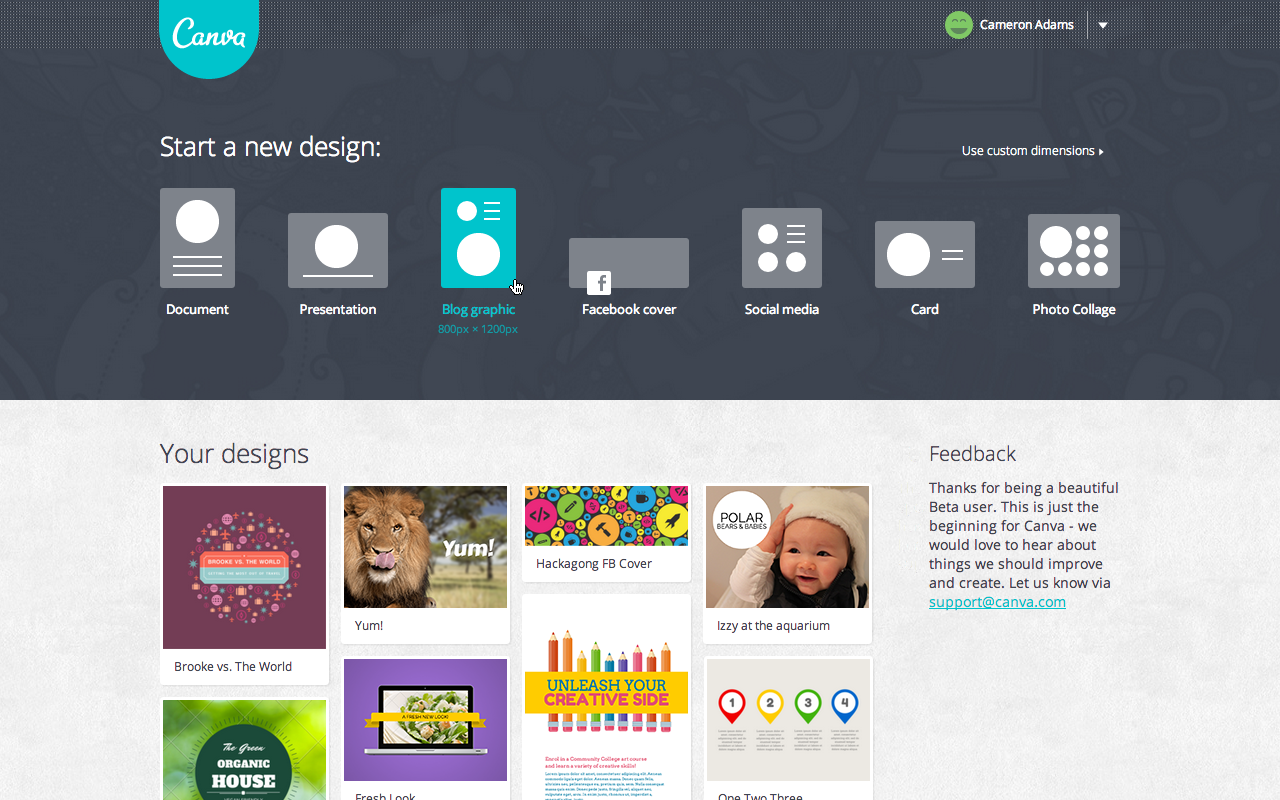
As you can see from the screenshot above, when you log into Canva, the first thing you do is select what kind of design you are making.  So, if you're doing a new Facebook cover, a poster, or a Twitter image, you just click on that design and the dimensions are already preset for you.
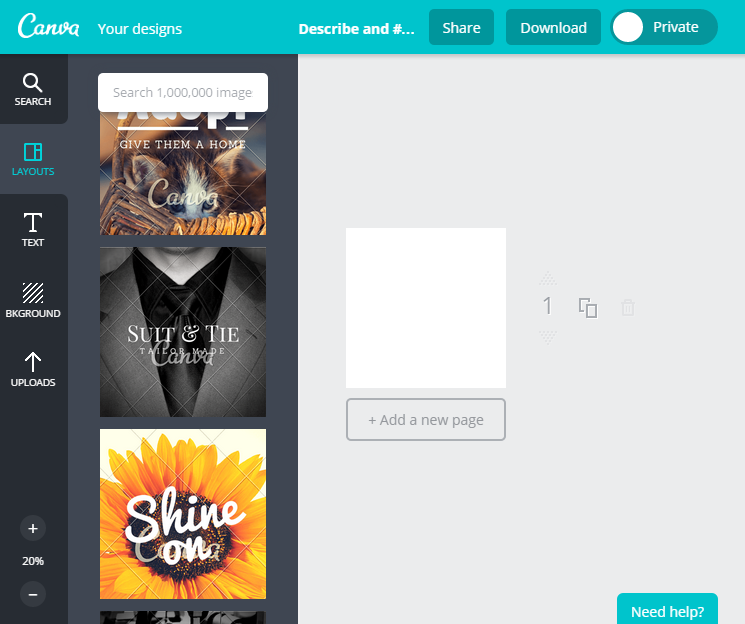
You can start from scratch or you can pick one of the templates that they offer on the left side. It is easy to search through them and adapt them to your needs. They do offer some free images and backgrounds and you may upload any of your own, but they also provide many different images that you can purchase for $1.

The only downside to this program is that they do not offer a generic template for all social media or a way to reuse one design in a different template. So, if your library is on Facebook and Twitter and you want to post the same content, you will need to recreate the second image from scratch. Yes, you can use a Facebook image for your Twitter account, but keep in mind that Facebook's ideal dimensions are different than Twitter's ideal dimensions, so your Facebook design will get cropped awkwardly in Twitter.
For the nondesigners, Canva also offers design school of short tutorials to teach you the basics to make any social media design look professional. And they also stream any images that people make public, which might inspire more designs for you to create for your library.  You can follow us at https://www.canva.com/5minlib.

Happy designing in 5 minutes!

Friday, December 12, 2014

Library Market: Redefining the Digital Presence of Libraries

I am excited to talk about Library Market, founded by current librarians (Ben Bizzle and Joe Box from Library Solutions, LLC and Craighead County Jonesboro Public Library), creating marketing and technology products and services that real libraries need. Their current projects are ones which I hear librarians and patrons asking for -- and three of them is ready for you to implement in your library!

LIBRARY CARD PLUS

See your patrons using a smartphone? This app is for them! It will allow them to link their card to a digital library card and will no longer need to keep a physical one on hand.

ONLINE LIBRARY CARD REGISTRATION

Some patrons will never set foot in a library, but it doesn't mean that they wouldn't use your online materials. This service will allow patrons to register for an online library card to access your databases, ebooks, and other digital content.


WEBSITE DESIGN

Thinking of redesigning your website? They offer website development services to training to support.


SOCIAL MEDIA IMAGES

Currently in development (I will update this post when it is live) and it is inspired from a current project, "The Library Facebook Image Dropbox". They will soon be posting social media images (collected from over 700 libraries) that all libraries can use for their social media networks. If you want to see what is already collected, use the Contact Us form for access to the Dropbox folder that currently holds 1,000+ images. June 22, 2015 UPDATE: You no longer need a Dopbox account! All you need to do is sign-up at Library Market and you can access all of these images directly online. Here's the URL: http://www.librarymarket.com/services/dropbox


I look forward to seeing what else Library Market develops!

Friday, November 21, 2014

LibraryReads: Top 10 Books From Librarians For Libraries

All around the internet, one can find articles about the top books to read this summer, this holiday, this year... But many of these lists aren't coming from libraries. I've always thought this was a shame, but in September of 2013, a group of librarians partnered with publishers to change that. You have to check out LibraryReads!

What is so cool about this initiative?
1. Every month, they publish a list of the top 10 titles that are being released within the next 31 days.
2. The nominations are only made by public librarians and can only be on books that haven't been published yet.
3. Due to the above, it is a great opportunity for librarians to band together and create buzz for our favorite reads.
4. Marketing materials are provided so that every library can easily get the word out to their patrons.
5. ALL public librarians are encouraged to participate, which means you!

Participation isn't hard. You need to make an account with Edelweiss, read an ARC (check out our next post for how to get an ARC, an advanced reading copy) and then write reviews on your favorite adult books. When you mark your review for LibraryReads (which can be a real review or just a quick "I love this!"), it counts as a vote. The top 10 books nominated are then published on the list.

This is only open to public librarians and the focus is only on adult books (YA crossover books that have adult appeal are welcomed). I am hopeful that they will branch out into YA and Children literature, but they just turned one year old last September, so we'll give them time. In the meantime, participate and advertise in your library!

Friday, October 24, 2014

The Beauty of Shortened URLs

There are many places that will shorten your URL links for free. My favorite is Bitly but there are other popular websites that basically do the same thing, such as TinyURL, Goo.gl, and Ow.ly. The concept for all of them is very simple:

1. Shorten your URL to make it easier to read and retype.
2. Customize your URL so it will make sense to your viewers (for example, three lines of a long URL for a Teen Writing Competition can be shortened to http://bit.ly/TWC2014).
3. Gather statistics on how many times they were clicked, where patrons found the URL (from email to Facebook to newspaper websites), and what time of day they are being accessed.

Why use this for you library? 

1. It is perfect for fliers. No one wants to type in a long URL and it fits much better if you're putting the URL on a pull tab flier. I've used it for event registration to writing contest submission links.  
2. It is easier to read in email and you don't have to worry about sending broken links. 
3. It's click tracking information is useful for targeting your marketing efforts. 
4. It is easy to remember. I made a short URL for our page test, which made it easy to bookmark the test to all 10 of our laptops. I also made resource guides on my Google Documents account, so when I want to add more information, I just have to type in the quick URL to access it (handy when you share multiple computers with your coworkers).
5. It looks professional. If you want to upgrade to a paid service, you can customize the whole URL to only reflect your name. But even if you use the shortener's domain, it just looks clean and organized to see a URL that makes sense instead of a URL that is three lines long of gibberish.

It is very easy to use. Check out a screenshot of Bitly (Click on image to enlarge):

Friday, October 3, 2014

Awesome Box: Sharing Patron Recommendations

The Harvard Library Innovation Lab came up with a great idea that is quickly spreading throughout the U.S. called Awesome Box. It is really simple in concept:

1. You go to their website and sign up: http://awesomebox.io/
2. They make you a special account just for your library and give you a widget to add to your library's website.
3. Then you make a box (any kind will do, from simple to fun) for people to return items that they think are awesome.
4. You check the items in (via the ISBN number) on your library account and then check it in normally.
5. Patrons can browse everyone's favorites and see what their fellow residents really enjoyed at your library.

It is a living, breathing display of awesome items that your patrons recommend. Totally awesome indeed!

The Harvard Library Innovation Lab is constantly coming up with new ideas and would love for people to try them out in their library and report back. If you are interested in participating, sign up for their bimonthly email newsletter, which also includes cool links to awesome things. 


An example of what patrons see when they visit your widget.

Update January 2016: Unfortunately, Awesome Box is no more. It was a great idea with over 500 libraries participating, this service will be missed!