Friday, November 4, 2016

3 Unbiased Election Websites to Recommend to Patrons

Are you or your patrons struggling with locating neutral information about election candidates? This was a question posed on Facebook recently, and the librarian community stepped up with three great suggestions. We thought we'd cover them here today so this information isn't lost in the black hole of the internet.


Ballotpedia

Ballotpedia call themselves the Encyclopedia of American Politics. We found them really easy to navigate and learn of general information about the candidates on your ballot. If you click on their names, you'll be redirected to a very comprehensive report on where they stand on the major issues, their campaign trail, and the polls. You won't find quick answers here on where they stand, but they are unbiased. 

They also provide all of the local measures and if you click on them, you'll be redirected to a page which provides an overview, background, who supports and who oppose and their reasoning why, campaign finance and more.

Vote Smart

Vote Smart's website is a little bit confusing in the beginning. You must type in a candidate's name or your zip code BEFORE you can click on the category folders. And the zip code might have too many district. Even when I provided my exact address, the list of candidates included people who weren't on the ballot. So, it is better to search for specific people on this website.

The categories are really helpful. They include the bio info, their votes, their positions, ratings, speeches, and funding. Vote Smart is a supporter of the Political Courage Test, which asks candidates to provide voters with their positions on key issues. Most candidates refuse to take this test, so Project Vote Smart has taken the time to research the presidential and congressional candidates' likely responses, based on their public statements and voting records. For those who don't want a comprehensive read, this section provides a simple yes or no to each key issue.

Vote 411

Vote 411 provides full election information from the League of Women Voters. Not only can you learn about your candidates, but they also provide the answers to all aspects of the voting process:
  • Absentee ballot information
  • Ballot measure information (where applicable)
  • Early voting options (where applicable)
  • Election dates
  • Factual data on candidates in various federal, state and local races
  • General information on such topics as how to watch debates with a critical eye
  • ID requirements
  • Polling place locations
  • Registration deadlines
  • Voter qualifications
  • Voter registration forms
  • Voting machines

While they do provide a personalized ballot, showing you who are the candidates that are running for office and where they stand on issues, we have found that they don't always provide more info than people's names. So, double check for your district before you recommend this website. Editor Note: We are unable to find any personalized ballots at this time, so we're now thinking that perhaps this part of the website is currently down. Hopefully, it'll be back up soon and provides more information than candidate names.


And there you have it -- in less than 5 minutes, three great and neutral websites that'll arm your patrons with the knowledge they're seeking. Happy voting, everyone!

Friday, October 28, 2016

Much Needed Laughter: Unshelved

Today we're highlighting a very special library webcomic: Unshelved.

For those of you who already know about it, you're lucky!

For those of you who haven't yet been introduced, this article is for you.

Unshelved is set in a library, following library staff as they go about their daily lives. It is created by Gene Ambaum and Bill Barnes, who truly understand librarianship. (Gene, which is his pen name, actually works/worked in a library, and it shows!)

As we all know, there is a lot of humor to be had when working with the public and figuring out whatever our library mission is in this day and age of change. I follow them on Facebook and had their comics set to be first in my newsfeed so I was sure to have my daily laugh.

Unfortunately, after fifteen years in the business, it was decided that this year will be their last year creating new Unshelved comics. They are in the process of making their 12th and final collection, called Overdue. If you would like to buy a copy, make sure to jump on over to their Kickstarter campaign and do so before Friday, November 4th. They have long since met their goal, but they will not be printing many extra copies. They are also offering lots of other goodies like the signed editions or the complete Unshelved ebook collection.

The good news is that their archive of comics will still be available online, even if you miss the Kickstarter campaign. Their Facebook page will still be active, showing classic comics from 15 years of humor. I highly recommend checking them out!

And don't forget to stop by their store, where you can buy cool stuff like a USB drive in the shape of a card catalog drawer or t-shirts.

Unshelved, you will be missed. No one has understood libraries like you. Thank you, Ambaum and Barnes, for over a decade of laughs!

Friday, October 21, 2016

Ready to Go! Book Display: Classics Reimagined

Welcome to our series, "Ready to Go!" Book Display. Once a month we'll highlight the latest or greatest for every age group (Adults, Teens, and Children) that you can promote within your library or order for your collection. This month we are focusing on classic books that have been reimagined.

Adult
Pride and Prejudice and Zombies by Jane Austen and Seth Grahame-Smith (Mar 2009)
A mysterious plague has fallen about the quiet English village of Meryton - and the dead are returning to life! Feisty heroine Elizabeth Bennett is determined to wipe out the zombie menace, but she's soon distracted by the arrival of the haughty and arrogant Mr. Darcy.
Set in an Oz where morose Wizard battles suicidal thoughts, the story of the green-skinned Elphaba, otherwise known as the Wicked Witch of the West, profiles her as an animal rights activist striving to avenge her dear sister's death.
Longbourn by Jo Baker (Oct 2013)
A reimagining of Jane Austen's "Pride and Prejudice" from the perspectives of its below-stairs servants captures the drama of the Bennett household from the viewpoint of Sarah, an orphaned housemaid.
Sense & Sensibility by Joanna Trollope (Oct 2013)
The Austen Project pairs six bestselling contemporary authors with Jane Austen's six complete works: Sense & Sensibility, Northanger Abbey, Pride & Prejudice, Emma, Persuasion and Mansfield Park. Taking these well-loved stories as their base, each author will write their own unique take on Jane Austen's novels.


Teen
Manga Classics: Sense and Sensibility by Jane Austen (Aug 2016)
When Elinor Dashwood's father dies, her family's finances are crippled. After the Dashwoods move to a cottage in Devonshire, Elinor's sister Marianne is torn between the handsome John Willoughby and the older Colonel Brandon. Meanwhile, Elinor's romantic hopes with Edward Ferrars are hindered due to his prior engagement. Both Elinor and Marianne strive for love while the circumstances in their lives constantly change. Other titles in this series includes: Jane Eyre, Great Expectations, The Scarlet Letter, Pride & Prejudice, Les Miserables, and Emma.
Splintered by A.G. Howard (Jan 2013)
A descendant of the inspiration for Alice's Adventures in Wonderland, sixteen-year-old Alyssa Gardner fears she is mentally ill like her mother until she finds that Wonderland is real and, if she passes a series of tests to fix Alice's mistakes, she may save her family from their curse.
Beowulf adapted and illustrated by Gareth Hinds (Mar 2007)
A graphic retelling of a Scandinavian warrior named Beowulf who, after defeating great evils, meets his match in the death-dragon of the deep. Hinds has written other retellings including: The Odyssey, King Lear, The Merchant of Venice, Romeo and Juliet and Macbeth.
Great by Sara Benincasa (Apr 2014)
In this contemporary retelling of The Great Gatsby, seventeen-year-old Naomi Rye becomes entangled in the drama of a Hamptons social circle and a tragedy that shakes the summer community.
The Wrath & The Dawn by Renee Ahdieh (May 2015)
In this reimagining of The Arabian Nights, Shahrzad plans to avenge the death of her dearest friend by volunteering to marry the murderous boy-king of Khorasan but discovers not all is as it seems within the palace.
Messenger: The Legend of Joan of Arc by Tony Lee (Sept 2015)
A graphic novel retelling of the story of Joan of Arc, who inspired and led French armies to fight for freedom against the British, only to be captured and executed when she was nineteen years old.
The Fall by Bethany Griffin (Oct 2014)
A retelling of Edgar Allen Poe's 'The Fall of the House of Usher' in which Madeline and her twin brother, Roderick, suffer from the Usher family illness but she hears the House talking to her, filling her dreams, controlling her actions, and ensuring she never leaves the property.

Kids
BabyLit Primers: Little Women by Jennifer Adams and Alison Oliver (Sept 2016)
These board books introduce the youngest readers to classic literature.
Reimagine one of Sherlock Holmes' most popular mysteries using the beloved Playmobil characters and figurines.
Macbeth #killingit by William Shakespeare and Courtney Carbone (Jan 2016)
William Shakespeare's tragedy told in the style of texts, tweets, and status posts. Other books in the OMG Shakespeare series include: A Midsummer Night #nofilter, srsly Hamlet, and YOLO Juliet. There's another series called OMG Classics that currently includes Scrooge #worstgiftever and Darcy Swipes Left.
Retells the epic tale of Odysseus, the ancient Greek hero who encounters witches and other obstacles on his journey home after fighting in the Trojan War, told from the point of view of the steadfast companion who never gives up home of his master's safe return.
Please Share, Aphrodite! by Joan Holub and Leslie Patricelli (Sept 2015)
An illustrated, easy-to-read board book retelling of the Greek myth of The Judgment of Paris, in which Aphrodite, awarded a candy apple, hurts the feelings of Hera and Athena with her gloating. Other books in the Mini Myths series include: Play Nice, Hercules!, Be Patient, Pandora!, Don't Get Lost, Odysseys!, Brush Your Hair, Medusa!, Good Job, Athena!, Be Careful, Icarus! and Make a Wish, Midas!


Friday, October 14, 2016

Library Halloween: Costumes for the Last-Minute Librarian


Halloween, how do we love thee? Of course, when you're programming, weeding, ordering, organizing, doing statistics, and everything else in our daily lives, holidays can sneak up on you. In the interest of making this holiday fun without adding any extra stress, we present a variety of inexpensive, book-themed costume choices for the Last Minute Librarian, some of which cost no money at all!

Zombie Librarian


It's our very own Kat!
Zombie Librarian (or, a zombie version of whatever random costume you have) - you need some face paint, fake blood, and talcum powder. Wear your already-ripped-and-stained librarian clothes, add some dirt and/or fake blood, and put talcum powder in your hair. There's a quick makeup tutorial here, which Kat wrote while working at the Lawrence Library in Pepperell, MA. (Note: Be careful wearing this one in the kids' room! It can be a little scary for little guys.)

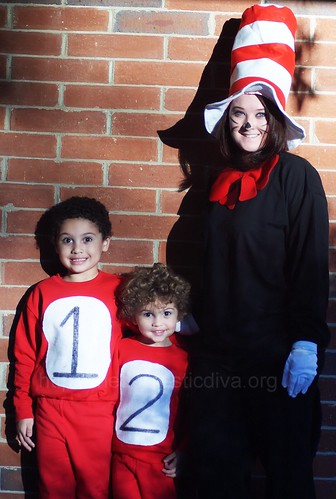
Cat in the Hat


via thedomesticdiva
Cat in the Hat - you need a black sweatsuit, a floppy hat, and a long piece of felt that you can tie into a bow tie. Add white or blue gloves and a little facepaint for a black nose and whiskers, and you're all set! 

Where's Waldo?


via Buzzfeed
Where's Waldo - Waldo is easy as pie! You'll need a red and white striped shirt and hat, blue jeans, and glasses. Adding his accessories (binoculars, a cane, a camera, etc.) can be fun, and you might already have them! Waldo's girlfriend Wenda is similar - instead of jeans, you'll want a jean skirt and red and white striped stockings.

Junie B. Jones


This one is from a school's Read Across America day!
Junie B. Jones - Much like Fancy Nancy, all you have to do here is wear a lot of loud patterns and colors at once, and tie a big, floppy bow on your head. Glasses are helpful but not mandatory. Sassy attitude is mandatory.

Fancy Nancy

It's Kat, again.
Fancy Nancy - This one is super easy. Put all your fancy clothes on at once! Bonus points for feather boas, fancy sunglasses, and any thing with lace, sparkles, or rhinestones.

Ms. Frizzle


via Twigsofthebranches
Ms. Frizzle - Everyone's favorite teacher. This one is especially fun because you can pick any topic there is, and Ms. Frizzle has probably taught about it. Cut out some felt shapes and stick them to an existing dress (and shoes), and put some in your hair. Special kudos for adding Liz the lizard.


If You Give A Mouse a Cookie

via ECYD
If You Give a Mouse A Cookie - overalls, a gray shirt, and a big, paper cookie! Mouse ears (which appear homemade here, and look fabulous) and a pink mouse nose with black whiskers complete the look.

I Spy

via tpcraft
I Spy - What a fun idea! Stick some stuff to the front of your shirt, and a list of what's there to the back! I love that the boy in the photos also has a book and a magnifying glass.

Olaf

via eastcoastmommy
Olaf - Because everyone has been Elsa by now.


The Paper Bag Princess

via scissorsandthread
The Paper Bag Princess - You could make the dress out of a large paper lawn bag, or a roll of brown butcher paper. The crown would be the same, but painted gold. (Pro tip: If wearing this to work, you'll want to wear something underneath it.)

Lady MacBeth

via xovain.com
Lady MacBeth - for the adult librarians out there! Put on a long nightgown, mess up your hair, carry a candle, and have (fake) blood on your hands, face, and nightgown. (If you're feeling adventurous, you could have a dagger, too.) If anyone bothers you, you're allowed to tell them, "Out! Out!"


Superman/Clark Kent

via http://cultmontreal.com - this was a ComicCon cosplay
Superman/Clark Kent - for the gentlemen out there. Wear your usual button-down white shirt, but have a Superman t-shirt underneath. You can either show it to people when they ask where your costume is, or keep it partially unbuttoned with your tie thrown over your shoulder to show that you're transitioning between the two. (Glasses a must for Clark Kent.)

Of course, we'd love to see what other ideas you come up with! Please let us know (and show us pictures!) in the comments here, on our Facebook page or on Twitter.

Friday, October 7, 2016

Get Out of Email Hell: 4 Week Challenge

What is email hell?
  • It is when you spend a lot of your time writing emails.
  • It is when you can't find an attachment that someone sent.
  • It is missing important information or forgetting to respond to emails.
  • It is opening your email and being overwhelmed by how many are sitting in your inbox.

But it doesn't have to be this way.

If you want to make changes and start reclaiming your inbox, join us in the 5minlib Get Out of Email Hell: 4 Week Challenge. It officially starts on Monday, October 17th. We break out the latest techniques for you to easily manage it all.

Because let's be honest. Our digital space is just as important as our physical space. Being organized and having a solid process can only increase your productivity and decrease your stress. Who doesn't want that? Join us on the 17th!

4 Week Challenge: Get Out of Email Hell


Day 1: Monday (Archive Folder)

Create a folder called "Archives" and move everything from your inbox to it. EVERYTHING. Congratulations, you're now at Inbox Zero! Have no worries, we will help you clear our your Archives folder, but it is much easier integrating your new process (which you'll learn over these 4 weeks) with an empty inbox.

Day 2: Tuesday (Follow-Up Folder)

Create a folder called "Follow-Up". This is the place your emails will go that you cannot quickly respond to, but eventually need to. Comb through your "Archives" folder and your current inbox, and move all appropriate emails over. Schedule on your calendar a day and time you'll carve out to respond to these emails.

Day 3: Wednesday (Block Time for Email)

Turn off email notifications. You don't need to know the instant an email appears in your inbox. Decide on when you will check your email during the day (right when you come in? Lunch? Thirty minutes before you leave for the day?) and plan at least 30 minutes to go through it. (Plan to check it twice a day if once is too little.) Tell your staff to call or visit you if they need a quick response. Too many emails unintentionally left unanswered because we open them when we don't have the time to answer, then we forget to respond. Be conscious of your time and do email on your own terms. Minimize those distractions for greater productivity in general!

Day 4: Thursday (Unsubscribe)

Search your email for the word "unsubscribe". All newsletters and email lists will appear. Unsubscribe from any newsletter that you never make time to read (or perhaps never even intended to sign-up for in the first place). From this point forward, if you get junk email that you do not care for in your inbox, immediately unsubscribe from it.

Day 5: Friday (Clean-Up Inbox)

Apply the above rules to your current inbox. Make sure when you leave today, your inbox is close to zero. Remember:

  • Don't keep an email in your inbox if it requires a task -- move it to the correct folder, and add the task to your To Do List.
  • If you need more time to respond, move it to the "Follow-Up" folder and make sure you schedule in your calendar a reminder to respond.
  • Unsubscribe from newsletters you don't want.

Day 6: Monday (Create Important Folders)

Go to your "Follow-Up" folder and carve out some time to clear it out. If conversations are completed, delete or move them to a special folder, any folder that makes sense to you (like "Director", "One Book, One Community" or "School Collaborations", etc.). Try to go generic first and then break it down to smaller folders if you find it is getting too big. Having too many folders can make things get complicated. For example, you don't need a folder for every staff member you work with -- you can have a generic "Staff" folder and then separate folders for those you email often ("Director", "Website Team", etc.).

Day 7: Tuesday (To-Do List Tool)

Decide on a To-Do List tool. I use Trello, but there are many apps you can use (Here's a great list) or even a paper calendar. From now on, when an email comes in that you need to do something for, move it out of inbox (delete or archive it into the appropriate folder) and mark it on your To-Do List. Make a note in your list where you saved the email for future reference.

Day 8: Thursday (Read Later Folder/Folders)

Go to your Archives folder and sort it by sender. Pay attention to the emails from organizations. After Day 4's purge, all that should be left are your favorite organizations (Maybe new book news, or Goodreads updates, or publisher emails). Make a filter/rule for them and have them skip the inbox, going directly into a "Read Later" folder. Then schedule in your calendar a weekly day/time when you will read that folder, especially if it is for professional development. (Alternately, you could roll all of these newsletters into one email using the program Unroll.Me if you use something like Gmail. It doesn't work for every email, though, like Outlook.)

Day 9: Thursday (Schedule Follow-Ups)

Are you keeping emails in your inbox because you are waiting for a response? Move them to the right folder and then set a day/time in your calendar to follow up. (Or, if you are using Gmail, you can download Boomerang, which will email you a reminder if no one responds within a set amount of time. You can also schedule emails to go out at a later date/time, which could come in handy.)

Day 10: Friday (Clean-Up Inbox)

Apply the above rules to your current inbox. Make sure when you leave today, your inbox is close to zero. Remember:

  • Don't keep an email in your inbox if it requires a task -- move it to the correct folder, and add the task to your calendar/To Do List.
  • If you need more time to respond, move it to the "Follow-Up" folder and make sure you schedule in your calendar a reminder to respond.
  • Unsubscribe from newsletters you don't want.
  • Create filters/rules to move unessential email to a "Read Later" folder.

Day 11: Monday (Digest Mode)

Make sure all of your Electronic Discussion Lists are set to digest mode, not individual emails. You'll get one email at the end of the day that groups together all correspondence. (If you are not on any electronic discussion lists, definitely check out ALA's Lists to get started!) Note: I used to have these redirected to a folder, but ended up never checking it. Now, I leave them in my inbox with a mental deadline -- they are deleted/archived by Friday, whether I read them or not.

Day 12: Tuesday (Create Rules to Immediately Filter the Unimportant)

Create a filter/rule to direct unimportant email (like order confirmations and deliveries from places like Amazon) directly into folders, skipping your inbox all together. You don't need to divert brainpower to those emails and you can easily access those folders on the rare occasion that there is a problem (i.e., can't find something that should have shipped). TIP: If you have to forward these emails to your administrative person, see if they can be added to the account directly, so they can get the email notification when you do.

Day 13: Wednesday (Make Templates)

Look through your sent email to see if there are any questions that you receive frequently. Select one of them and write a generic response template. (Perhaps you get a lot of questions about volunteering at the library or someone is interested in learning more about one of your monthly programs, etc.) Save this response so the next time you receive an email, you can quickly pop this in and hit send. (I actually save this in my drafts but you don't have to.) From this point forward, whenever you get a common question, make sure you save your response.

Day 14: Thursday (Touch It Once Principle)

Adopt the "Touch It Once" Principle. Since you have now scheduled when you will focus on email, you can focus on using your time efficiently when you're in your email. This philosophy means that when you open an email, you finish all tasks needed to then file/delete that email. No emails hanging overhead, no forgotten responses. And, best of all, you'll be saving all of that time you would have used rereading or avoiding the email.

Day 15: Friday (Clean-Up Inbox)

Apply the above rules to your current inbox. Make sure when you leave today, your inbox is close to zero. Remember:

  • Don't keep an email in your inbox if it requires a task -- move it to the correct folder, and add the task to your calendar/To Do List.
  • If you need more time to respond, move it to the "Follow-Up" folder and make sure you schedule in your calendar a reminder to respond.
  • Unsubscribe from newsletters you don't want.
  • Create filters/rules to move unessential email to a "Read Later" folder.

Day 16: Monday (Invoices and Bills)

Make a plan for dealing with invoices and bills. Email may not be the best place to store them, especially if you have to process them later. You can use IFTTT to automatically send them to Dropbox or Evernote, which is much easier to find documents than email. If you need to follow-up, move them into your follow-up folder or To Do List.


Day 17: Tuesday (Email has Limitations)

Understand email's limitations. It isn't great for sensitive subjects, conflict resolution, or any topic that requires a lot of back and forth. Use email instead to plan a meeting (face to face if possible, or just over the phone). No matter how nicely worded an email is, miscommunication is bound to happen. You can avoid many problems just by talking it through, watching for verbal, facial, and body cues, and saving yourself many emails in the process.

Day 18: Wednesday (Be Direct)

Make your emails short and to the point. Start off with your main point and then support it afterwards. Try also to think ahead and avoid future emails. If you are looking for a meeting day/time, give your schedule for next week (don't make them play email tag to find the best time). Use bullets to clearly make your points, and follow-up with a phone call if it is important. Most importantly, make sure your signature ALWAYS provides your phone number and address.

Day 19: Thursday (Find More Efficient Tools)

Are there ways you are using email that could be done more efficiently elsewhere? Perhaps it is better to create a Google Form for common questions, so you can get all the information you need without having to email back and forth multiple times. Or perhaps you are trying to setup a meeting with a group of people and can use using something like Doodle to make it easier and involve less emails.

Day 20: Friday (Share Challenge with Someone)

Congratulations!

You have completed our 30 Day Email Challenge. Reflect on the past tasks and see what worked well for you, what didn't. Make changes as you see fit and schedule a time each week or month for you to "clean out" your inbox so that you can remain on top of it!

Today's task is a call to action. If you participated in our email challenge, please let us know in the comments below, or tell us on Facebook/Twitter. If you found it useful, pass this challenge along to someone else and/or tweet about it on Twitter with the hashtag #5minlibEmailChallenge. 

Let's save each other from Email Hell. 

Friday, September 30, 2016

New Facebook Groups for Librarians!


Last year, we wrote a post highlighting all of the Facebook Groups that are for Public Librarians. We recently updated the list and wanted to highlight below our new additions! Some of these groups are new and some we recently found! A few have been added since our original posting, so we included them below in cased you missed them.

Happy Facebooking!


COLLECTION DEVELOPMENT SUPPORT

https://www.facebook.com/groups/CollectionDevelopmentSupport/
A place to ask for collection development suggestions and support.
413 members


DIGITAL LIBRARIANS & DEVELOPERS IN THE STACKS

https://www.facebook.com/groups/763880967005882/
A lab for digital librarian developers—a place where new tech products and services for libraries and communities, media and publishing, are created and innovated—and a space for discussion. This is also our informal pool of librarian developer contractors we will go to when we need to hire for short-term, freelance, contract work. Thanks for allowing us to add you :)
269 members


FLANNEL FRIDAY

https://www.facebook.com/groups/flannelfridayfun/?_rdr
Welcome to Flannel Friday's Facebook page! FF is a non-profit* international group of librarians and educators working together to share quality beyond-the-book experiences for children.
2,652 members


ILLERS; A FB GROUP FOR INTERLIBRARY LOAN LIBRARIANS

https://www.facebook.com/groups/172179662942180/
This is a place where you can post anything related to the libraries' resource sharing activities.
673 members


INTELLECTUAL FREEDOM FIGHTERS

https://www.facebook.com/groups/456760254514041/
The Intellectual Freedom Fighters (IFF) want to get Intellectual Freedom issues on the minds, hearts, and tongues of the wider library community. We want to inform you about these issues and provoke tough conversations. We intend to create change in the wider library world. The IFF is an outgrowth of the ever-vigilant ALA Intellectual Freedom Round Table (IFRT), which has been protecting your freedoms since 1973. [...] The IFF Group is here to get the whole library community thinking about Intellectual Freedom questions. We all face difficult issues and scary situations sometime, let's face them together. Comments are eagerly solicited, although uncivil or off topic posts may be deleted.
New Group! 58 members


LIBRARIAN MEMES

https://www.facebook.com/groups/1709521932616653/
NOT TO BE CONFUSED WITH LIBERTARIAN MEMES This is a group for sharing all your library, school, and learning memes! Invite your friends!
2,188 members


LIBRARY CONS AND FESTS

https://www.facebook.com/groups/LibraryConsAndFests/
A group for libraries and librarians to share information related to holding conventions and festivals of all kinds, from book fairs to comic cons.
313 members


LIBRARY COMMUNICATIONS CONFERENCE

https://www.facebook.com/groups/ALCOP/
Library Communications Conference Group - join in the conversation about issues related to library outreach and communications. The Library Communications Conference connects marketing, public relations, special events, fundraising, outreach, and program development professionals for public and academic libraries.
590 members


LIBRARY MANAGEMENT GROUP

https://www.facebook.com/groups/1524906657799350/
This group is for topics related to library management- supervising, programming, budgets, advocacy, outreach, etc. Feel free to ask for advice, start a conversation, or rant. Though this is intended to be a safe environment, please be careful when discussing sensitive personnel matters. No sales pitches, advertising, bullying, harassment, or any other obnoxious behaviors will be tolerated.
1,260 members


LIBRARY POKÉMON GO SUPPORT #POKELIBRARY

https://www.facebook.com/groups/pokelibrary/
Support for libraries who are experimenting with Pokémon GO programming and outreach. What to share here: your program ideas, your publicity samples, your event photos, news and commentary, funny memes appropriate for use on social media, research and analysis, trends you notice,and anything else you think might be helpful.
946 members


LIBRARIES STEP UP (IN TIMES OF CRISIS)

https://www.facebook.com/groups/libcrisis
Our mission is to kick ass and save the day, library-style. We're a centralized location for collecting and disseminating information about urgent political or natural disasters' effects on libraries and library services.
524 members


Music Librarians

https://www.facebook.com/groups/157147244323011/

For music librarians!
453 members


REFORMA THINK TANK

https://www.facebook.com/groups/Reformathinktank/
Welcome to the REFORMA Think Tank. REFORMA is the National Association to Promote Library and Information Services to Latinos and the Spanish Speaking. In this space, librarians, community members, and activists who serve the Latino and Spanish speaking communities in the United States and beyond will be able to share ideas, recommendations, and benchmarks to support each other in providing better services to our communities.
556 members


SOLO LIBRARIANS NETWORK

https://www.facebook.com/groups/739055509526456/
Solo librarians (and librarians who work in small libraries) can come here to share ideas and engage in discussion. Librarians in any sort of institution (public, academic, school, corporate) are welcome!
319 members


TATTOOED LIBRARIANS

https://www.facebook.com/groups/2431775521/
For librarians with tattoos!
1,320 members


ZINE LIBRARIANS

https://www.facebook.com/groups/zinelibrarians/
A group to talk about zine librarianship! How to build a collection, how to catalogue zines, how to organize zine events, and more! All zine librarians and archivists are welcome: academic, digital, DIY, public, school, volunteer, etc.
263 members


For more groups and to see the complete list of Facebook for Librarians, please visit our original post:

Friday, September 23, 2016

5 Hot Places to Find Free Professional Development


There is nothing like the feeling when you attend a professional development session that opens your eyes to something new and exciting. Even better if it is something new that you can apply back in your library. In our humble opinion, there is no better way to stay motivated on the job than constantly learning something new. But when to find the time to learn something new? Conferences can get expensive and the timing could conflict with your availability schedule.

Have no fear! There are many online options which you can do on your own time! Here are a few of our favorite places to go for Professional Development!

1.Wyoming State Library Training Calendar   


We have to give props to Wyoming State Library. They collect all online training and share it in a very convenient calendar. Find something you want to learn about but you can't attend the session? Most say to sign up anyway and they'll email you a link to the archived video.


2. Webjunction

If Wyoming's calendar is overwhelming to you, Webjunction is the place to visit. They take these events and divide them by category. They also provide FREE self paced courses and webinars (upcoming and archived past videos) to all library workers and volunteers.

3. Language Classes

If you have patrons that speak a language you don't know, it may be helpful to use your library's language programs (Mango or Transparent tend to be the most popular). If the library you work in doesn't have these programs, check your home town library or your state library. The language programs may also have quick guides to help library professionals, like Transparent's Survival Spanish for Librarians.

4. Free Online Courses

There are many other fee online courses if you start look by subject instead of profession. What do you want to learn more about? Google Analytics? Social Media Tips? Photography? There are free courses for them all!

45 free online classes you can take (and finish) by the end of this year
Genealogy webinars and courses (free and fee-based)
Free credit-eligible courses for in-demand jobs
Lynda.com (free 10 day trial, though many libraries also offer this program)

5. Conference Materials from State and Small Conferences

There are many reasons why you may not be able to attend conferences, but that doesn't mean you can't benefit from them! Many of them (especially state and smaller conferences) will share their presentations and handouts online, freely available to anyone. Check them out after their conference ends! Some examples:

Massachusetts Library Association
Missouri Library Association (Google Drive Folder)
Colorado Libraries for Early Literacy
Texas Library Association

So, there are endless places to learn. The question now is what time are you going to carve out of your calendar to learn something new?